In short
- An enquiry from a form should go to one place, with an assigned person and a reply deadline.
- A confirmation for the customer should say who will reply and when, with no promises beyond your control and no prices.
- Leads from Meta ads can be routed to the same CRM or sheet through an integration, an intermediary tool or an API.
- You choose the tool according to the number of submissions and who will maintain the flow, not the other way round.
- Before launch, test the whole flow on the real form, including the reminder and a failure of the intermediary service.
Table of contents (9)
An enquiry from a form lands in an inbox that somebody checks "when they have a moment". The customer does not know whether the message arrived, and you do not know who was supposed to reply. Automating a contact form turns this into a steady flow: the enquiry is saved in one place, the customer gets a confirmation, and a specific person gets a task with a deadline.
What happens to the form in many companies
Most often the form sends a message to a single email address, and everything after that depends on people. This works as long as there are few enquiries and one person watches the inbox.
The same problems keep repeating in many small businesses:
- the enquiry gets lost between offers from suppliers and newsletters,
- two people reply to the same person, or neither does, because each assumes the other will,
- nobody knows how many enquiries came in during the week and how many of them ended in a conversation,
- an enquiry from a Meta ad goes somewhere other than one from the website, so some contacts never make it to the shared list.
From practice: Companies rarely lose customers because of a poor offer in the reply. More often they lose them because the reply came after several days, or not at all. This can be fixed with a process, not with more work.
Contact form automation step by step
The flow below can be built in a small business without a large system. The order matters, because each step uses the previous one.
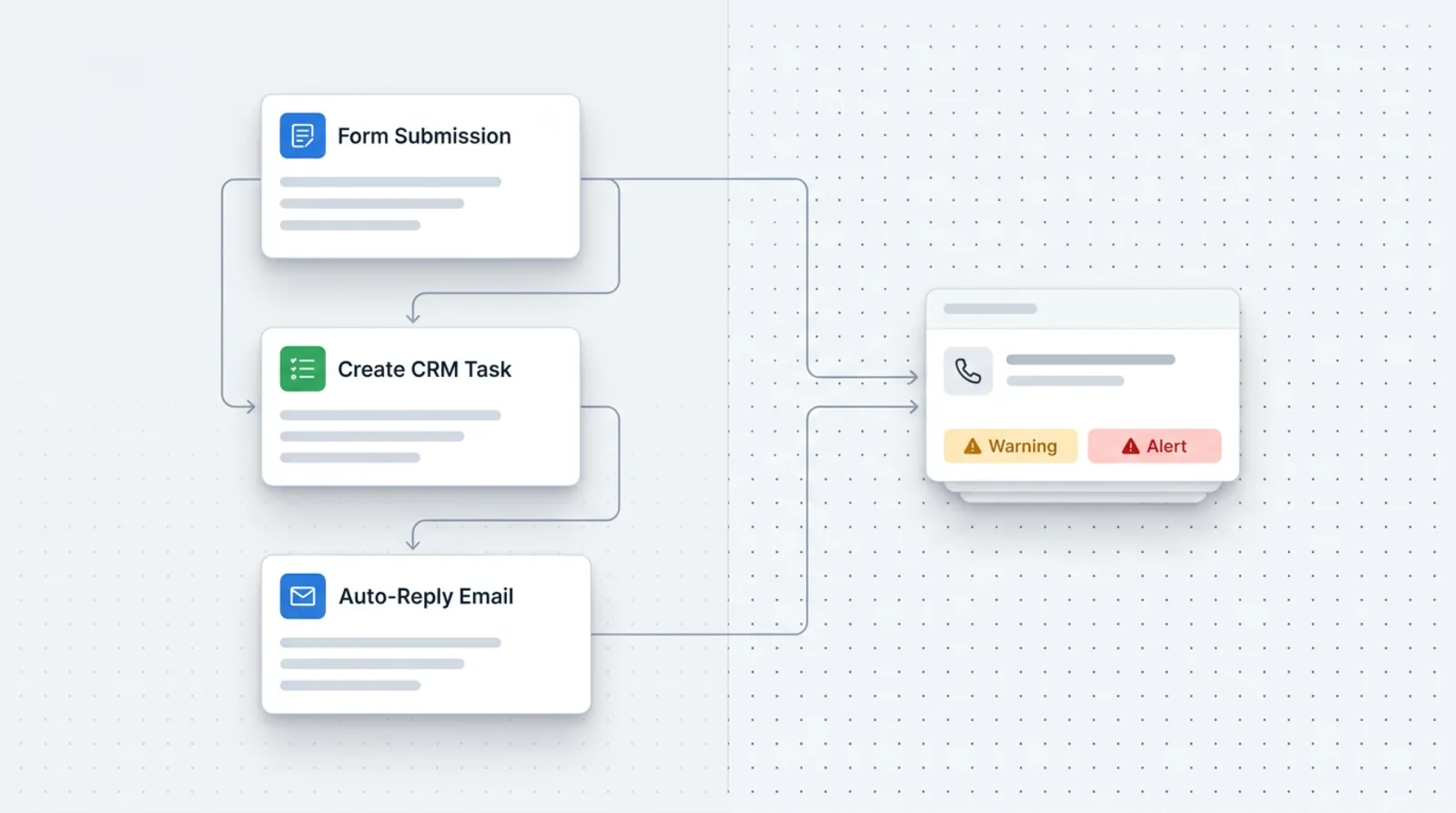
- A form on the website. You ask only for what is needed for a first reply: name, a way to contact, the content of the enquiry, and consent or information about data processing.
- Saving the contact. The data goes into a simple CRM or a Google Sheet, in one table, with the date and the source of the enquiry.
- An automatic confirmation for the customer. The message arrives within moments of the form being sent.
- A task for the person responsible. The system assigns the enquiry to a specific person and sets a reply deadline.
- A notification. That person receives an email or a notification in a messenger they already use at work.
- A reminder. If the task has not been marked as done by the deadline, a reminder goes to the same person, and then to their manager.
- A weekly report. Once a week you get a summary: how many enquiries came in, how many were handled, how many are waiting.
What to write in the confirmation for the customer
The confirmation should reassure, not sell. Write that the enquiry arrived, who will get in touch and within what time, and what the customer can do if the matter is urgent (for example, call a number).
Do not promise what you do not control. The sentence "we will reply within 15 minutes" is risky if the form was filled in on a Saturday evening. It is better to give your working hours and a realistic deadline, for example "the next working day". Also do not put a price or a preliminary quote in the auto-reply, because the customer will treat it as an offer.
Who does what: the automation and the human
Automation does not replace a conversation with the customer. It takes over the repetitive tasks so that a human can focus on the reply.
| Step | What the automation does | What the human does |
|---|---|---|
| Form | Checks the fields are valid, saves the submission | Decides which fields are needed |
| Saving the contact | Adds a row or record with the date and source | Cleans up duplicates from time to time |
| Confirmation | Sends a ready-made message | Writes and approves its content |
| Task | Assigns a person and sets a deadline | Sets the assignment rules |
| Notification | Sends an email or messenger alert | Reads the submission and replies to the customer |
| Reminder | Checks after the deadline whether the task was closed | Closes the task after replying |
| Weekly report | Compiles the numbers from the table | Draws conclusions and improves the process |
Meta ad forms in the same place
Enquiries from ads with a native form are worth collecting where the enquiries from the website go. Otherwise you have two separate lists and two sets of rules.
Meta describes several routes in its help centre: a direct integration with a CRM system, a connection through an intermediary tool such as Zapier, or your own tool based on webhooks and an API. Leads can also be downloaded manually from Ads Manager or Meta Business Suite, but then someone has to remember to do it, and that brings back the problem of lost enquiries. For details and the available integrations, check the Meta help centre, because the list changes over time.
On the advertising side, what happens after the form is sent also matters. I write more about the campaign itself in the article on a Meta campaign for a contact form.
Which tools to choose
You choose the tool according to the number of submissions, who will maintain the flow, and the systems the company already has.
- A Google Sheet is enough to start with, when there are few enquiries and one or two people reply.
- A simple CRM makes sense when you need contact history, statuses and assignments.
- Tools such as Make or Zapier connect the form, the spreadsheet, email and a messenger without programming. The price is dependence on an external service and its limits.
- A custom integration pays off when the flow is unusual or touches many systems.
I compared the approaches in a separate post: Make, Zapier or a custom integration. If you do not know which process to start with, the list of processes to automate in your business will help.
GDPR in an automated form
A form collects personal data, so the GDPR rules apply to it, even when an automation does everything.
- An information clause. Next to the form, show who the data controller is, for what purpose you process the data and how to contact you. UODO (the Polish data protection authority) publishes explanations about the content of such clauses, among others in a notice on the address of the supervisory authority.
- Data minimisation. Ask only for what is needed to reply. Collect a phone number if you will really call.
- Retention period. Decide how long you keep enquiries that did not result in a contract, and set up automatic deletion or flagging of old entries. The period depends on the purpose and should be justified.
- An auto-reply without sensitive data. Do not copy the content of the enquiry or information about health or the customer's situation into the confirmation. The message may land on a shared account or be forwarded.
- Intermediary tools. If data passes through an external service, check where it is stored and whether you have a proper processing agreement with its provider.
These are general rules. In a specific business, the final wording is worth consulting with the person responsible for data protection or a lawyer.
How to test the flow before launch

Run the test on the real form, not only in the tool's settings. Check in turn:
- sending the form from a phone and from a computer,
- the entry in the sheet or CRM: whether all the fields went into the right columns,
- the content and sender of the confirmation, including in the spam folder,
- whether the right person received the task and whether it has a deadline,
- the notification and the reminder after the deadline, which you can test by shortening the deadline for the trial,
- a submission with Polish characters, a very long text and empty optional fields,
- a test submission from the Meta form, if you use one,
- what happens when the intermediary service is briefly down: whether the submission is not lost, or whether only an error message appears.
After launch, review every submission by hand for the first few days. Errors in field mapping usually come out exactly then.
From practice: The most common mistake after launch is a task assigned to a person who is on holiday. Plan a stand-in before you start the flow.
Where to start in your business
Start by writing down what happens today to a submission from the moment the form is sent. Note who sees it, who replies and where a trace remains. The gaps are usually visible within a few minutes.
Then, in this order:
- choose one place to collect enquiries (a sheet or a CRM),
- write the confirmation text and the information clause,
- name a responsible person, a stand-in and a reply deadline,
- build the flow and run the test from the list above,
- after the first week, review the report and fix what does not work.
If you want someone to design the flow for your tools, see automation for small businesses and describe your case.
Frequently asked questions
Is a Google Sheet enough instead of a CRM?
At the start, yes, if there are few enquiries and one or two people handle them. When you need contact history, statuses and assignments, it is better to move to a simple CRM.
Can an automatic reply harm the company's image?
Not if it is short, specific and honest about the timing. What harms is a message that promises a quick reply and then does not keep to it.
How long should I keep enquiries that did not result in a contract?
It depends on the purpose and has to be justified. Set a specific period, put it in the information clause and configure automatic deletion or flagging of old entries.
What should I do when nobody replies by the deadline?
The flow should send a reminder to the responsible person, and after the next deadline to their manager. This way an enquiry does not go unanswered just because someone was busy.
Can this be done without a programmer?
A simple flow can be built in tools such as Make or Zapier. You need a programmer when the process is unusual or involves many systems.
Sources

Author
Piotr Babczyński
I help businesses win customers online: SEO, Google and Meta ads, automation and AI. I work from Szczecin, Poland, and remotely. I write about what I test on real projects.
- 30 years in IT
- SEO and Google Ads
- AI implementation
- #form
- #CRM
- #automation
- #GDPR