In short
- According to the MF's page, KSeF is mandatory from 1 February 2026 for the largest businesses, from 1 April 2026 for the rest, and from 1 January 2027 for everyone, including those previously exempt.
- Issuing and fetching purchase invoices and passing them to the accountant can be done from a program integrated with KSeF via an API.
- KSeF doesn't send notifications, so the program has to check regularly for new invoices on its own.
- You settle the scope of the obligation and the booking of invoices with your accountant; this post describes only the organisation of the document flow.
Table of contents (7)
- What the Ministry of Finance says about KSeF deadlines
- What in KSeF can be automated and what stays with you
- How to build a simple invoice flow step by step
- An offline invoice, the QR code and the KSeF number: what people ask about most
- What this post doesn't cover and what to settle with your accountant
- Where to start in your business
- Frequently asked questions
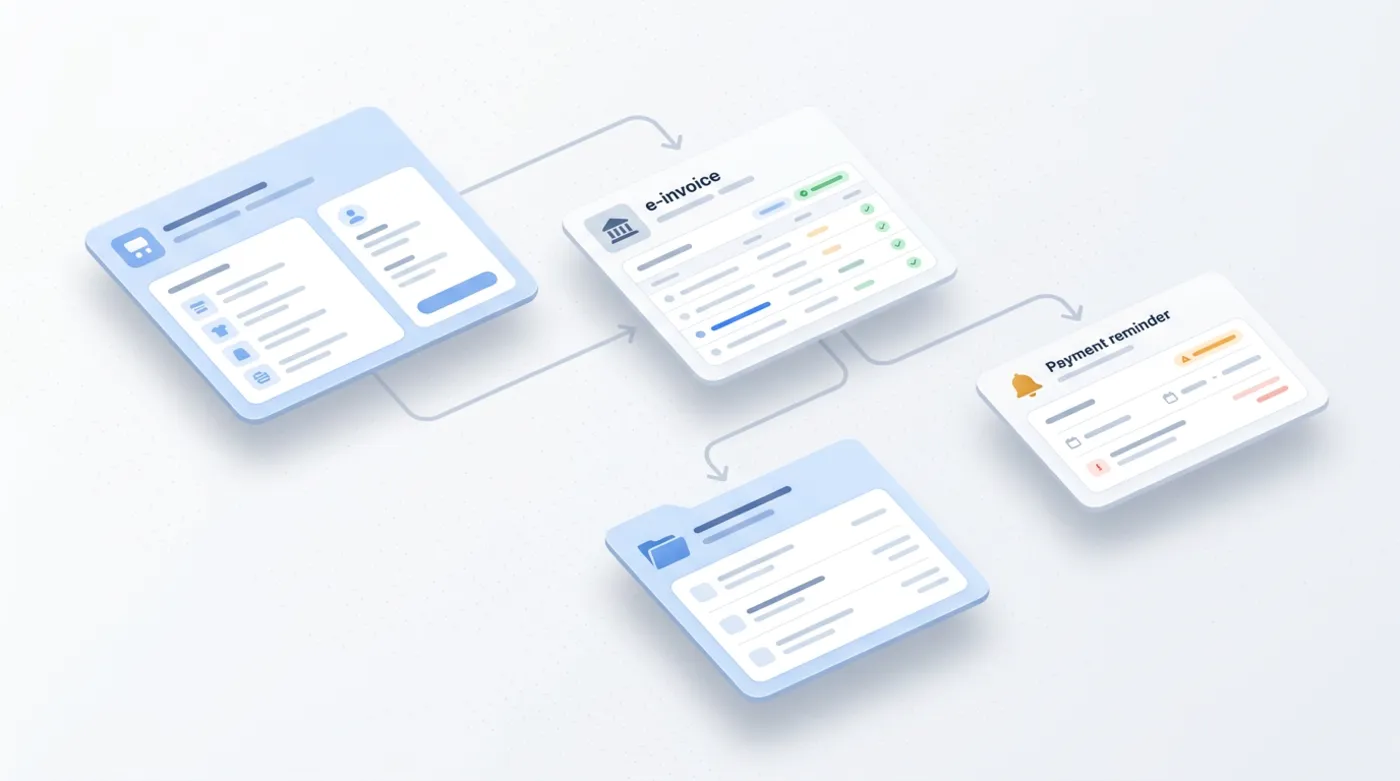
KSeF invoice automation in a small business comes down to one rule: an invoice should be created once, in the system where you sell anyway, and from there it should travel on its own. You issue it from your sales or accounting program, the program sends it to KSeF (Poland's national e-invoicing system) and collects purchase invoices, and your accountant gets the full set without any effort from you. Retyping from PDFs into Excel stops making sense. Below I describe what I checked in the Ministry of Finance's materials and what can realistically be automated.
What the Ministry of Finance says about KSeF deadlines
All the dates in this post come from the page ksef.podatki.gov.pl and are current as of November 2026. I did this deliberately, because many old deadlines are circulating online.
- From 1 February 2026, KSeF applies to businesses whose sales value (including the amount of tax) exceeded PLN 200 million in 2024.
- From 1 April 2026, it applies to all other businesses.
- Until the end of 2026 a simplification applies: invoices may be electronic or paper, provided that the total value of sales (including tax) documented by them in a month is less than or equal to PLN 10,000.
- From 1 January 2027, KSeF is mandatory for everyone, including businesses previously exempt.
Receiving invoices is a separate matter. According to the Ministry of Finance (MF), receiving invoices through KSeF has been mandatory since 1 February 2026. So even if you issue few invoices, your contractors may already be issuing invoices to you in this system.
There are fewer than two months left until 1 January 2027. If the exemption for small sales applied to you, this is the moment to prepare a process, not to learn on your first invoice.
From practice: What I see most often is a small business putting KSeF off because it associates it with yet another "government portal". In practice, though, most of the work is to be done by the program you already use. Your role is to grant permissions and check that everything arrives.
What in KSeF can be automated and what stays with you
I prefer an honest division to a promise that "everything will happen by itself".
| Stage | What the system can do | What stays with you |
|---|---|---|
| Issuing an invoice | The sales program creates an invoice from the order data and sends it to KSeF | Correct customer data and prices in the catalogue |
| Purchase invoices | The program regularly fetches new invoices from KSeF | Approving the purchase, if your business requires it |
| Passing to the accountant | Invoices go to a shared folder or into the accountant's system | Agreeing the format and deadline with the accountant |
| Payments | A reminder about the payment date, a notification that an invoice has been paid | The decision on when to call a debtor |
Issuing from the sales system
MF states that KSeF can be used through financial and accounting programs integrated with the system via an API. In practice this means that an invoice is created from an order in the shop, from a booking or from an entered service, without typing it in a second time in a separate tool. The program also has its own look for the invoice (a visualisation), which must match the data in KSeF in substance.

Fetching purchase invoices
For most businesses this is the biggest saving. According to MF's answers, the system allows an integration through which invoices are fetched automatically. There is one important caveat: KSeF doesn't send notifications, so the software has to check regularly on its own whether new invoices have appeared. Set it up so that nobody has to remember it, and so that if fetching fails, someone gets a signal that something isn't working. This is where a mistake is easiest to make, because the lack of a notification from KSeF means that silence looks the same as no invoices.
Passing to the accountant
You can grant your accountant permissions in the KSeF Taxpayer Application or in the integrated program. MF also describes the option of granting permission to a whole accounting office, with the option of passing it on to the office's staff. This way the accountant doesn't wait for emails with attachments, but works on what is in the system.
How to build a simple invoice flow step by step
The scheme below is general. The specific settings depend on your program and on how your accountant works.
- Choose one invoicing program that has an integration with KSeF via an API. If you use an older version of the integration, MF notes that after the move to KSeF 2.0 an integration is necessary. Ask your supplier about its status.
- Grant permissions to the people who are to issue or view invoices. It is worth doing this deliberately, separately for each person, rather than with one shared account for everybody. That way you know who issued what and who can view purchase invoices.
- Turn on fetching of purchase invoices in the program and check how often it queries the system.
- Agree with your accountant in what form they receive documents and by when in the month.
- Add payment reminders: an automatic message to the customer before and after the due date.
- Run a trial on a few invoices before you go live with everything.
If you keep copies of documents elsewhere, remember to protect them. I wrote about this in a separate post: backups in a small business.
An offline invoice, the QR code and the KSeF number: what people ask about most
In online mode, the invoice issue date is the date it is sent to KSeF, and once the system accepts it the invoice gets a KSeF number. If you pass an invoice on outside the system (for example as a PDF), MF recommends a QR code with the KSeF number, which lets it be verified and downloaded from the system.
When there is no connection, there is offline24 mode. According to MF, you can issue an invoice without a connection to KSeF, but you must send it to the system by the next working day at the latest. Such a document requires QR codes before sending. A good program will do this for you, but it is worth knowing that this mode exists.
From practice: In rollouts, the problem is most often not the technology itself but the lack of agreements: who has permissions, who receives purchase invoices, and what we do when an invoice arrives with the wrong company details. Write it down on one sheet.
What this post doesn't cover and what to settle with your accountant
I am not a tax adviser and I don't replace your accountant. This post describes the organisation of the document flow, not tax settlements. All the details, such as whether the simplification up to PLN 10,000 applies to you, which invoices fall within the scope of KSeF and how to book them, settle with your accountant.
It is worth knowing about two exclusions described by MF in the scope of mandatory KSeF: invoices for consumers, and invoices under some special VAT procedures. The details are on the page on the scope of mandatory KSeF. According to MF's answers, penalties for errors in KSeF have been postponed to 1 January 2027. That is not a reason to put off your preparations, but time for calm testing. You'll find the full questions and answers in the KSeF 2.0 questions and answers section.
Where to start in your business
- Check on the MF's page which group you fall into and from when.
- Ask the supplier of your invoicing program whether it has an integration with KSeF 2.0 and how fetching purchase invoices works.
- Book 30 minutes with your accountant and agree on permissions and how documents are passed on.
- Write down the invoice process from order to accountant. If you don't know which steps are worth automating first, the post on processes to automate in your business will help.
- Link sales to the invoice so that data doesn't go into the system twice. I described similar logic for a contact form connected to a CRM.
If you like, I can go through your invoice flow with you and connect the programs so that documents land where they should on their own. See automation for small businesses or write through the contact form.
Frequently asked questions
From when is KSeF mandatory for a small business?
According to the MF's page, from 1 April 2026 for the remaining businesses, with a simplification until the end of 2026 for sales of up to PLN 10,000 a month. From 1 January 2027, KSeF is mandatory for everyone. Confirm your own situation with your accountant.
Can I fetch purchase invoices automatically?
Yes, MF describes an integration through which invoices are fetched automatically. The system doesn't send notifications, so the software has to check regularly on its own whether new documents have appeared.
Can my accountant get access to my invoices in KSeF?
Yes. Permissions can be granted in the KSeF Taxpayer Application or in the integrated program, including to a whole accounting office. Agree the scope of permissions with your accountant.
What if I have no connection to KSeF?
MF describes offline24 mode: an invoice can be issued without a connection, but it must be sent to the system by the next working day at the latest. A good program handles this for you.
Is this post tax advice?
No. I describe the organisation of the invoice flow based on MF materials. You settle interpretations and settlements with your accountant or tax adviser.
Sources

Author
Piotr Babczyński
I help businesses win customers online: SEO, Google and Meta ads, automation and AI. I work from Szczecin, Poland, and remotely. I write about what I test on real projects.
- 30 years in IT
- SEO and Google Ads
- AI implementation
- #KSeF
- #invoices
- #automation
- #accounting