In short
- Google ranks local results by relevance, distance and prominence, and rankings cannot be bought.
- Complete your Business Profile first: category, services, hours, photos and a name matching your sign.
- A business without an office can appear in Maps as a service-area business, but should hide an address where it does not receive customers.
- Reviews and a website with separate service pages and consistent business details strengthen prominence and relevance.
Table of contents (12)
- What local SEO is
- How do you get into the top three in Google Maps?
- Start with the Business Profile
- Can a business without an office appear in Google Maps?
- Reviews: the factor you can influence most
- Your website: where locality has to be visible
- Choosing local phrases
- A plan for the first month
- What to avoid
- How to measure results
- Summary
- Frequently asked questions
To rank your business in your own town, you need three things working together: a complete Google Business Profile, customer reviews, and a website that says clearly what you do and where. Google ranks local results by relevance, distance and prominence. You cannot change distance, but you can work on the other two. Rankings cannot be bought, so what remains is honest, steady work.
What local SEO is
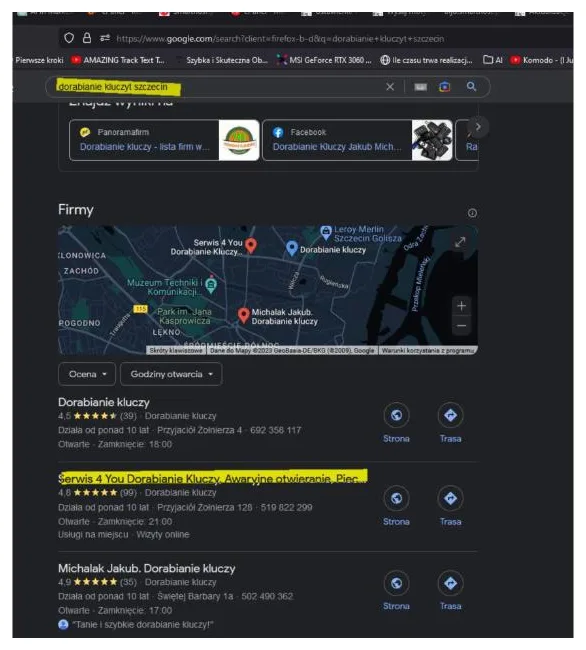
Local SEO is everything that makes your business appear when someone searches for a service near them or with a town name in the query. There are two result types. One is the map with a few businesses above the regular results. The other is the normal list of web pages.
Different things matter in each. The Business Profile drives the map, while your website drives the page list. Anyone targeting a phrase like "local SEO" or "SEO in a particular city" should look after both.
How do you get into the top three in Google Maps?
Google states it directly. Local ranking depends on three factors:
- Relevance – how well the profile matches what someone is searching for. Google advises giving complete information so it can match you to the right searches.
- Distance – how far the business is from the searcher. Google uses the location data it has, even when the person has not shared it explicitly.
- Prominence – how well known the business is. It is influenced by the number and quality of reviews and by links to the business from other websites.
The same help page says that you cannot ask Google for a better local ranking or pay for one. Businesses with complete and up-to-date information are more likely to show. So you cannot change distance; polish relevance and prominence. Nobody honest can promise a top-three spot, because part of the equation is outside your control.
Start with the Business Profile
If you do only one thing, complete the profile. I cover it in a separate post on the Google Business Profile. The key points:
- Primary category matching what you really do. It is the strongest relevance signal.
- Services and descriptions in your customers' own words, not jargon.
- Opening hours, phone, website always current, including holiday hours.
- Real photos: the shopfront, the interior, your work, your team.
- Business name exactly as on your sign and website.
The last one is where the temptation is. Google's guidelines say the name must not include things like marketing taglines, phone numbers, URLs, location information or descriptions of services, and unnecessary extras can lead to suspension of the profile. Adding "cheap services city centre" to your name can hurt rather than help.

From practice: The most common mistake I see in small business profiles is empty fields: no service descriptions, no photos, no holiday hours. A profile created in a hurry a year ago often still looks the same.
Can a business without an office appear in Google Maps?
Yes, if it serves customers at their location. Google calls this a service-area business. Think plumbers or cleaners, as well as hybrid businesses that have a premises but also serve customers on site.
The rules:
- You define the service area by cities, postcodes or areas, not by radius.
- You can list up to 20 areas.
- The area should cover places within roughly two hours' drive.
- If you do not serve customers at your address, remove it from the profile. A home address should not be visible.
In practice a business without a premises can appear in Maps, but it may find "near me" searches harder, because distance is measured from a location Google knows. That is one more reason to strengthen relevance and prominence.
Reviews: the factor you can influence most
Since prominence depends partly on the number and quality of reviews, collect them regularly. Ask right after a job is done, with a short link by text message or a QR code. I describe how to do it calmly and within the rules in my post on how to get Google reviews.
Answer every review, including negative ones. A calm, factual reply shows future customers how you treat people. Do not buy reviews and do not ask only happy customers. It is dishonest towards customers and risky for the profile.
Your website: where locality has to be visible
The profile is half the work. The other half is a site that confirms what you do and where.
- A separate page for each service. Do not put everything on the home page.
- The town in the content, not just the footer. Say which districts and towns you work in and show real projects.
- Consistent business details. Name, address and phone must be identical on your site, profile and directories.
- LocalBusiness structured data. Google requires a name and address and recommends, among others, a phone number, opening hours and coordinates. It does not guarantee display, but it helps Google understand the page.
- A fast, readable mobile site. Many local searches happen on the move.

I describe what I do on the technical and content side for local businesses on the local SEO page.
Choosing local phrases
Local searches are usually short: a service plus a town. In the keyword tool I used, Polish searchers type "pozycjonowanie lokalne" about 720 times a month, "pozycjonowanie Szczecin" about 480 and "pozycjonowanie stron Szczecin" about 390. These are tool estimates, not exact figures, but they show the scale: local phrases are smaller, yet often lead to a concrete enquiry.
The approach is the same in any town. List your services, add the town or district, and check which phrases customers really use. I walk through it in my post on choosing keywords. Do not create dozens of near-identical "service + town" pages with no real content. It is weak and pointless work.
A plan for the first month
If you start from scratch, I suggest this order:
- Week 1. Check the profile exists and is yours. Complete category, services, hours and contact details. Add a dozen real photos.
- Week 2. Decide how you will ask for reviews and ask your first customers. Prepare a short link or QR code.
- Week 3. Review the site. Does each service have its own page? Do phone and address match the profile? Does it load fast on a phone?
- Week 4. Record your starting point: profile views, Search Console queries, number of calls. Without it you will not know in three months whether anything improved.
Fix the basics first, then look for clever tricks. If the profile is empty and the site is slow, no extra tactic will make up for it.
What to avoid
- Fake addresses and virtual offices just to "be" in the centre. Google needs real details, and an address where you do not serve customers should be removed from the profile.
- Adding the town to the business name, as described above.
- Buying reviews. Your message to customers should be: "if you were happy, tell us how it went".
- Several profiles for the same business. One premises, one profile.
- Abandoning the profile. A profile left untouched for a year falls behind competitors who add photos and answer reviews.
How to measure results
Watch three things: profile views and actions (calls, directions, website visits), queries in Search Console, and the number of customer enquiries. Map rankings change with the searcher's location, so check from several points, ideally while not logged in to Google.
To see how this looks for a real local business, read the case study of a Szczecin photographer.
From practice: Business owners often expect changes after a week. A profile reacts faster than a website, but I still count results in weeks and months, not days. That is why changing settings every few days is not worth it.
Summary
Local SEO has three pillars: a profile with complete data, reviews, and a website confirming your services in a given town. Distance is given; the rest is up to you. A business without an office can also appear in Maps if it sets the service area properly and hides an address where it does not receive customers. Start with the profile, then reviews, then the site, and measure monthly.
Frequently asked questions
How do I get into the top three in Google Maps?
Google considers relevance, distance and prominence. You mainly influence relevance (a complete profile) and prominence (reviews, links); a ranking cannot be bought or honestly guaranteed.
Can a business without an office appear in Google Maps?
Yes, as a service-area business. You define the area by cities or postcodes (up to 20 areas) and remove from the profile any address where you do not serve customers.
Can I add the town to my business name on the profile?
No. Google's guidelines forbid location information, taglines and service descriptions in the name, and a breach can lead to suspension.
Is LocalBusiness structured data enough to rank higher?
No. It helps Google understand the page, but Google does not guarantee that features using structured data will appear in results.
How quickly will local SEO show results?
Profile changes can show sooner than website changes, but I count results in weeks and months. No exact timeframe can be promised.
Sources

Author
Piotr Babczyński
I help businesses win customers online: SEO, Google and Meta ads, automation and AI. I work from Szczecin, Poland, and remotely. I write about what I test on real projects.
- 30 years in IT
- SEO and Google Ads
- AI implementation
- #Local SEO
- #Google Business Profile
- #Maps