In short
- A newsletter makes sense when clients come back or take a long time to decide; for a one-off service it is better to start with the Google business listing and reviews.
- Commercial information by email requires the recipient's prior consent (Article 398 of the Electronic Communications Law), and the address must be given knowingly.
- Double opt-in is not directly required, but it protects against wrong addresses and gives you proof of consent.
- Every message should have the sender's details and an easy unsubscribe link; configure SPF, DKIM and DMARC.
- Measure clicks, replies and enquiries, and treat opens as indicative.
Table of contents (8)
- Why a service business needs a newsletter, and when it makes no sense
- A business newsletter and the law: consent, GDPR, unsubscribing
- How to build an address list without breaking the rules
- Mailbox requirements: SPF, DKIM, DMARC
- What to send, how often, and what a message should contain
- How to measure newsletter results
- Where to start: a plan for the first send
- Frequently asked questions
A well-run newsletter for a service business reminds people of you at the moment a client needs the service for the second time. It needs no advertising budget, but it does need order in your consents and in your email settings. Below I describe why a business needs a newsletter, when to skip it, and how to get from an empty list to a first send that follows the rules.
Why a service business needs a newsletter, and when it makes no sense
A newsletter makes sense where clients come back or take a long time to decide. A plumber, an accountant, a photographer, an air conditioning service, a beauty salon or a renovation company usually has a group of people who have already used the service once and will do so again after some time.
A message every now and then keeps in touch without phoning and without the cost of every click, as in advertising. You remind people about a service check, the season, a new service or free dates. A person who was still hesitating will see that the business is active and getting in touch.
When a newsletter makes no sense:
- you sell a one-off service the client practically never returns to (and you have nothing in your offer that would interest them later),
- you have no contacts from people who signed up themselves or gave their consent,
- you have no idea what to write and do not intend to write regularly,
- nobody in the business has an hour a month to prepare a send.
In that situation it is better to start with the Google business listing and reviews. You can add a newsletter later.
A business newsletter and the law: consent, GDPR, unsubscribing
To send commercial information to an email address you need the recipient's consent. In Poland, the Electronic Communications Law (Prawo komunikacji elektronicznej) has applied since 10 November 2024. Its Article 398 prohibits using automated calling systems and telecommunications terminal equipment to send commercial information, including direct marketing, unless the recipient has given prior consent. Consent can be given by providing an email address for the purpose of receiving commercial information at that address.
On top of that comes GDPR, because the email address of an individual is personal data. You must know on what basis you process it, and tell subscribers who the controller is, for what purpose you collect the address and how long you keep it. The simplest way is a short notice next to the form, with a link to the privacy policy.
Remember two things:
- Consent must relate specifically to the newsletter. It must not be hidden in the terms and conditions or ticked on the client's behalf.
- Unsubscribing must be easy. UODO (the Polish data protection authority) reminds us that you can object to direct marketing at any time, and after that the data may no longer be used for that purpose.
From practice: the most common problem I see is not a complete lack of consent, but a lack of proof that it was given. When someone complains, you have to be able to show when, from where and to what wording the client signed up.
I do not describe all the exceptions and nuances here. If you run a business in a regulated industry, or you send to other businesses rather than to consumers, check with a lawyer how these rules apply to your situation. I also wrote about personal data in tools in the post AI and GDPR in a business.
How to build an address list without breaking the rules

Build the list only from addresses that someone knowingly gave you. Do not import contacts from business cards, from an old mailbox or from purchased databases, because you have no consent for a newsletter from them.
Proven places to sign up:
- A form on your website. Short, with one field for the address, a separate checkbox and a clear description of what and how often you will send.
- A contact or order form. A separate checkbox, not ticked by default: "I want to receive the newsletter". Consent to be contacted about a quote is not the same as consent to a newsletter.
- After the service is done. You can ask the client whether they want to receive reminders and tips. What matters is that they answer themselves and that you record when and how they did so.
If you connect your contact form to a customer management system, consent can be recorded automatically together with the contact. I describe this in the post about a form that creates a task in your CRM by itself.
Double confirmation (double opt-in)
After signing up, the system sends a message with a link that has to be clicked. Only then does the address go onto the list. The rules do not require this method directly, but I recommend it as good practice for two reasons. It protects against typos and against other people's addresses entered by mistake or maliciously. It also leaves a trail: the date, time and wording of the consent, which you can show if there are doubts.
Mailbox requirements: SPF, DKIM, DMARC
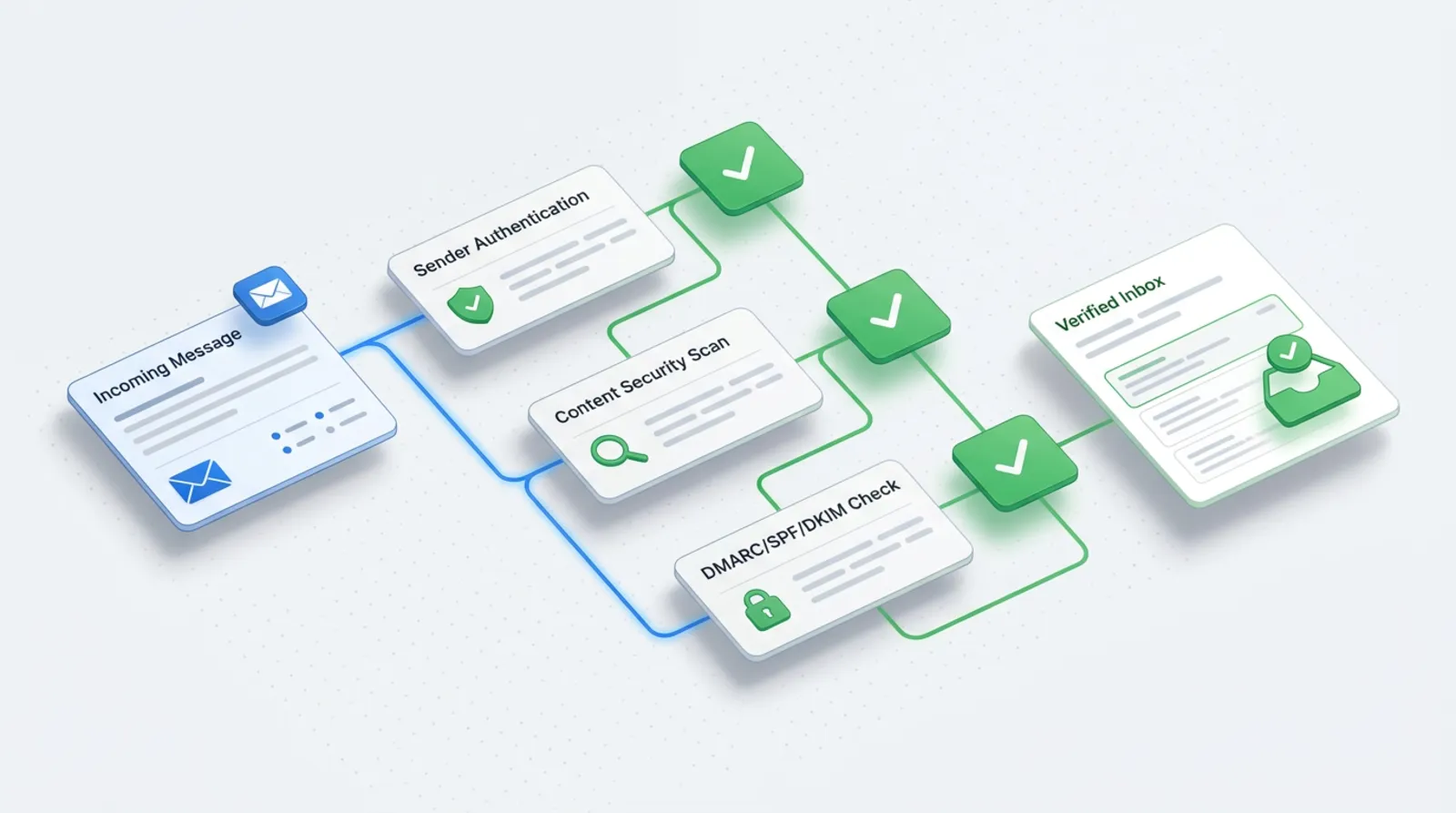
Even a lawful message will not reach the recipient if the mailbox considers it suspicious. In its official help, Google describes the requirements for senders who send more than 5,000 messages a day to Gmail accounts. For a small business that threshold is usually far away, but I follow these rules from the first send, because it is simply good order.
Google's documentation shows that such senders are expected to:
- authenticate the domain with SPF and DKIM and configure DMARC,
- have the domain in the "From" field match the authenticated domain,
- allow one-click unsubscribing (List-Unsubscribe headers) and show a visible unsubscribe link,
- keep the spam report rate below 0.30%, and preferably far lower.
What does this mean in practice? SPF, DKIM and DMARC records are added in the domain settings (DNS). Most newsletter tools walk you through it step by step and show whether the configuration is correct. If you are not sure, ask an IT person or IT support. Send from an address on your own domain, not from a free mailbox.
What to send, how often, and what a message should contain
Send what the client will actually use: seasonal reminders (a service check, a deadline, preparing for winter), short tips, news about your offer, free dates. One message, one topic, one button.
How often depends on your industry and how much you really have to say. To start with, choose a rhythm you can keep up without effort, for example once a month, and say so in the form. It is better to send less often but regularly than once every six months and then five times a week.
From practice: the first messages are best written as if you were replying to one client you know. The list of a small business is usually people who know you, so a conversational tone works better than the tone of a leaflet.
Elements of a message worth having in every send:
| Element of the send | What for | Mandatory or recommended |
|---|---|---|
| Sender details (company name, address, contact) | The recipient sees who the message is from | Mandatory (the sender must be clearly identified) |
| Unsubscribe link | Easy opt-out, compliance with GDPR and mailbox requirements | Mandatory |
| Subject | Says what the message is about; must not mislead | Recommended |
| Preheader (a short text visible next to the subject) | Complements the subject in the mailbox preview | Recommended |
| Information on where you got the address | Reminds people of signing up and reduces spam reports | Recommended |
| One clear button or link | Makes it easier to measure the response | Recommended |
How to measure newsletter results
The most reliable measures are clicks, replies to the message and enquiries that came in after the send. Treat the open rate as indicative. Some email programs, including Apple Mail with privacy protection switched on, may download images in the message automatically, which inflates the number of "opens". The exact effect on your statistics cannot be determined in advance, so do not base decisions on them.
Add campaign tags (UTM) to the links in the newsletter so that in Google Analytics you can see how many people came to the website and whether they sent the form. Also watch the number of unsubscribes and spam reports. When they rise, the problem is usually sending too often or content that does not match what subscribers expected.
Where to start: a plan for the first send
The plan below usually takes a few days of work spread over time. The details depend on the tool you choose.
- Set a goal. Write in one sentence why you have a newsletter: returning clients, seasonal reminders, new services.
- Choose a sending tool that supports confirmed sign-up, an unsubscribe link and working on your own domain.
- Configure the domain: SPF, DKIM and DMARC, sending from an address on your own domain.
- Prepare the sign-up form with separate consent, a short information notice and a link to the privacy policy.
- Switch on double confirmation and test the whole process with your own address.
- Invite those who may sign up: on your website, in the footer of an offer message, after finishing a service. Do not send the newsletter to people who have not given consent.
- Write the first message: short, with the sender details, one topic and an unsubscribe link. Send it first to yourself and to addresses in several different mailboxes.
- Measure the effect after a week: clicks, replies, unsubscribes.
Launching a newsletter lawfully is mainly a matter of order: consent and configuration first, content after. If you like, I will help set up the form, the domain and the first send as part of marketing activities, and repeatable steps, such as saving consents to the client database, can be linked into automations.
Frequently asked questions
Can I send a newsletter to clients who bought a service from me?
The purchase alone is not consent to a newsletter. You need consent to commercial information sent by email, so ask the client for it separately, preferably in a form or after the service is done. Record when and how they gave it.
Can I use addresses from business cards and an old mailbox?
No, if those people did not agree to a newsletter. An address given for another purpose, for example a quote, does not authorise sending commercial information. Invite these people to sign up, but do not add them yourself.
How many people do I need on the list for it to be worth starting?
There is no general threshold. Even a few dozen engaged people who know the business can bring returning clients. More important than the number is whether you have something to say regularly.
Which sending tool should I use?
Choose one that supports confirmed sign-up, an unsubscribe link, domain authentication and export of consents. Pick a specific name to suit your budget and the number of addresses; compare current terms on the providers' websites.
What should I do when someone asks to be removed from the list?
Remove them from the list without delay and do not send the newsletter again. Keep only what is needed to remember their opt-out, so that you do not add them again at the next import.
Sources

Author
Piotr Babczyński
I help businesses win customers online: SEO, Google and Meta ads, automation and AI. I work from Szczecin, Poland, and remotely. I write about what I test on real projects.
- 30 years in IT
- SEO and Google Ads
- AI implementation
- #newsletter
- #GDPR
- #email marketing